Taking exams or quizzes in one of the three CSN Testing Centers is free of charge.
**********************************************************************************
IMPORTANT INFORMATION PERTAINING TO PROCTORING:
- You must make an appointment to take exams. Best is to do it at the beginning of the semester before all time slots are taken and you need to wait in line for up to 3 hours. Failure to do so may cause you not to be able to take your exams during their availability period which will result in a 0%.
- You MUST show a driver's license or an official state ID, military ID, or a passport. All must be UNEXPIRED. Otherwise, you will NOT be tested! The instructor WILL NOT accept excuses such as "I lost my ID" or "My ID was stolen" or "I didn't have time to go to the DMV".
**********************************************************************************
To find the location of a CSN Testing Center and to make an appointment to take an exam or a quiz, go to the following link: https://www.csn.edu/testing
Next, select the campus at which you want to take the exam or quiz. Please understand that sometimes no more appointments are available at a campus of your choice. In that case, you must make an appointment at a different campus!
HINT: The Henderson Campus Testing Center usually has openings and its staff is the most accommodating! It might be worth the drive!
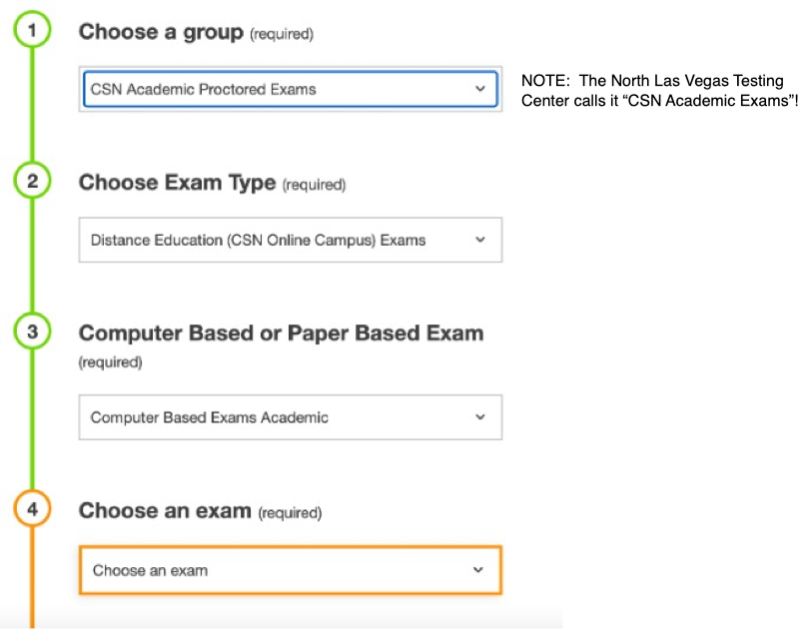
You will be taken to a new page similar to the one below, and you need to input certain information.
Step 1 through Step 4:
In Step 4 above, find my name (INGRID Stewart), then select an exam or quiz from YOUR CLASS:
**************************************************************************************************
MATH 124EWR Exam 1, 2, and 3 (Ingrid Stewart) (Web-Remote course taken during the entire 16 weeks of the semester)
Math 124EWR Final Exam (Ingrid Stewart) (Web-Remote course taken during the entire 16 weeks of the semester)
**************************************************************************************************
Math 116OL Final Exam (Ingrid Stewart) (Online course taken during the entire 16 weeks of the semester)
Math 116HY 8W1 Final Exam (Ingrid Stewart) (Hybrid course taken during the first 8 weeks of the semester)
Math 116HY 8W2 Final Exam (Ingrid Stewart) (Hybrid course taken during the second 8 weeks of the semester)
Step 5 - choose a date (you must find the dates your exam/quiz is available as per the course calendar)
Step 6 - choose a time
Step 7 - enter your personal information
Step 8 - acknowledge that you have read the exam or quiz guidelines
Finally click on the button "Add to Cart." You will be taken to a new page.
Click on the link "Complete Registration."